How this was made.
The starting point was a single 200 KB file, disc.ssd: a disk image for the BBC Micro, a British home computer from 1981. This page covers how it became the game on this site. The game was treated as unknown: everything about how it plays was worked out from the code on the disk.
The ground rules. The request was to turn the disk into a game playable in the browser with sound, using the data provided. Any outside knowledge had to be agreed first. Before going further I asked three questions:
- Should the original code be emulated, or the game rewritten? A native JavaScript rewrite was chosen.
- What outside knowledge could be used? Only technical facts about the BBC Micro: its processor, screen modes, operating system and sound chip. Nothing remembered about the game itself.
- Should the BASIC title sequence be kept? No, skip straight to the game.
So the rules of the game described below were all read out of the program, not recalled.
1Opening the disk
An .ssd file is a byte-for-byte copy of a single-sided floppy in Acorn's DFS format. It holds 80 tracks of 10 sectors of 256 bytes. The first two sectors are the catalogue: file names in one sector, and each file's load address, run address, length and start sector in the other. Decoding it gave three files:
| File | Loads at | Runs at | Bytes | What it turned out to be |
|---|---|---|---|---|
| !BOOT | – | – | 48 | Startup commands: switch to BASIC, set memory, run CHUCKIE |
| CHUCKIE | &1900 | – | 3,536 | A BBC BASIC program: the loader |
| CH_EGG | &1100 | &29AB | 9,984 | 6502 machine code: the game |
(The BBC Micro writes hexadecimal with an & prefix; this page does too.)
2The BASIC loader
BBC BASIC stores programs "tokenised": keywords such as PRINT are saved as single bytes. Turning those bytes back into keywords gave a readable listing. This was the only place the game's identity appeared:
REM C H U C K I E   E G G   by  Doug Anderson
REM Copyright (C) A & F Software 1983
The loader draws an animated logo, defines sound envelopes, and shows a Teletext instructions page. It explains that 1 to 4 players use direction and jump keys to "collect a dozen eggs", and that the keys can be redefined. Then it runs the real program with *RUN "CH_EGG". It also writes six bytes into memory at &3BF–&3CA, an area normally used for cassette loading. Nothing in CH_EGG refers to them.
3Taking the machine code apart
CH_EGG is raw 6502 machine code: no symbols or comments, with data mixed in among the instructions. A disassembler that just reads straight through would decode data as nonsense instructions. Instead, mine started from the run address and followed every jump, call and branch, marking which bytes are really code. Everything else is data.
The first routine it reached explained the memory layout. The program copies its top 2 KB (&3000–&37FF) down to &0900, then switches the screen to MODE 2. That mode shows 160×256 pixels in 16 colours and uses &3000 upwards as screen memory, so drawing the first frame destroys the original copy. With that relocated block included, the disassembly came to about 3,050 instructions in 66 subroutines.
The most useful discovery was what the program does not do. It never touches the hardware directly. It goes through the operating system for a handful of things:
| OS call | Used for |
|---|---|
| OSWRCH | Text, palette, clearing the screen and positioning (the "VDU" codes) |
| OSBYTE &81 | Is a particular key held down? |
| OSBYTE &79 / &7A | Which key is pressed? (for redefining keys) |
| OSWORD 7 / 8 | SOUND and ENVELOPE |
| OSWORD 3 / 4 | Read and reset the 100 Hz interval timer (frame pacing) |
| OSWORD 0 | Read a line of text (high-score names) |
All graphics during play are written straight into screen memory by the game's own code. So with these few calls understood, the whole machine was accounted for.
4A throwaway emulator, used as a microscope
Reading 3,000 instructions cold is slow and error-prone, so I built a tool: a 6502 processor emulator, plus stand-ins for exactly the OS calls above. It runs the original CH_EGG unmodified and saves its screen as a picture. It isn't part of the game; its jobs were to show what the code does and, later, to check the rewrite.
The first run showed a high-score table and a "Press S to start" prompt. Simulating S, then 1 for one player, showed the first level: platforms, ladders, eggs, birds and a large caged bird in the corner. Now each routine could be matched to something visible.
The emulator also answered a timing question. Each frame of play ends by waiting until the timer shows at least 3 centiseconds since the last frame, so the game runs at most 33.3 frames a second. If a real BBC Micro sometimes took longer than that, the game would slow down there. Counting the processor cycles of every instruction (the machine runs at 2 MHz) settled it:
Play therefore ran at a steady 3 cs per frame, and a fixed 30 ms tick reproduces it exactly. Pauses outside play are busy-wait loops whose length depends on processor speed, so their real durations were measured the same way.
5Reading the code
Graphics
A table at &1100 lists 54 sprites as width, height and data address. Each sprite is 1 bit per pixel. The drawing routine doesn't paint pixels; it flips them with exclusive-OR. Drawing a sprite twice in the same place therefore erases it, so moving an object is just "draw at old position, draw at new position".
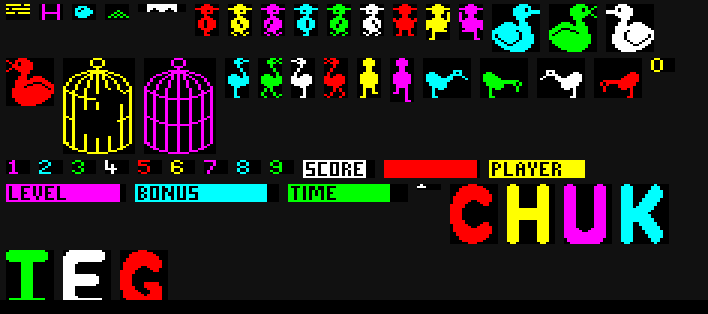
Each kind of object flips a different bit of the 4-bit colour value: platforms, ladders, eggs, the player and birds each have their own. The palette, set by 16 VDU 19 commands at start-up, then maps the 16 combinations to on-screen colours. Any combination that includes the player's bit shows yellow, and any with a bird's bit (but not the player's) shows cyan. Overlapping objects therefore still look right, with no masking and no redrawing of what's behind.
Levels
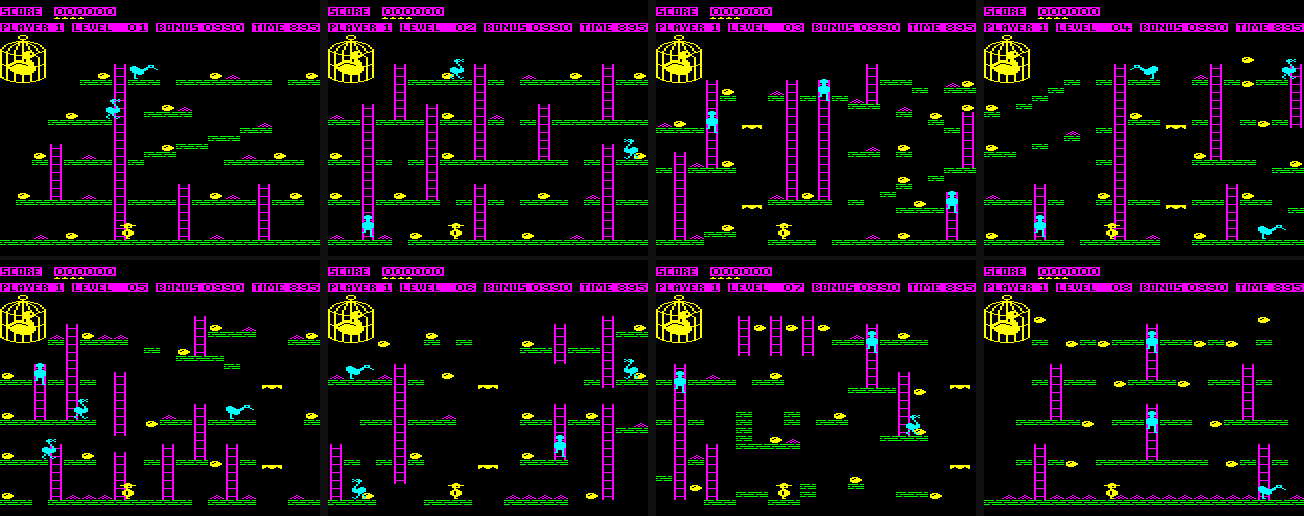
A table at &0CC0 points to 8 level layouts. Each starts with five counts: platforms, ladders, whether there's a lift, piles of grain, and birds. Then come lists of coordinates on a 20×25 grid of 8×8-pixel cells:
header     platforms, ladders, lift?, grain, birds
platforms  row, first column, last column     (repeated)
ladders    column, first row, last row        (repeated)
lift       column                             (if present)
eggs       column, row                        (always 12)
grain      column, row                        (repeated)
birds      column, row                        (always 5 starting places)
Parsing all eight this way ended each one exactly where the next began. Strong evidence the format was right.
As a level is drawn, the game also builds a 20×25 map in memory at &0600. Each cell's low bits say "platform", "ladder", "egg" or "grain". For eggs and grain, the top four bits record which one, so collecting it can be remembered per player. Every collision test in the game is a lookup in this map.
The rules, as the code tells them
The rest was a matter of tracing the main loop and naming every variable. Each frame it reads the keys, moves the player, plays footsteps, moves the lift, moves birds or ticks the clock, checks for an extra life, then checks for collisions. The rules came out of that code:
- Goal: collect all 12 eggs to finish a level. Each egg is worth 100 points, rising by 100 every four levels (up to 1,000).
- Grain is worth 50 points and stops the clock for 20 ticks. The small birds stop to eat grain too, and what they eat is gone for good.
- The clock starts at 900, or less in later rounds, and ticks down every 8 frames (0.24 s). Reaching zero costs a life.
- The bonus starts at 1,000 × the level number (up to 9,000) and drops by 10 every five clock ticks. What's left is added to the score, 10 points at a time, when the level is finished.
- Losing a life: touching a bird, falling off the bottom of the screen, being carried into the top of the screen by the lift, or running out of time. Each player starts with 5 lives and gets another every 10,000 points.
- Small birds walk the platforms and ladders. At each junction they pick a direction at random, but never turn back unless there's no other way.
- The big bird sits flapping in its cage on levels 1–8. From level 9 the cage is open and it flies after the player, speeding up towards them and bouncing off the screen edges.
- After level 8 the layouts repeat, harder each time round: levels 9–16 have only the big bird, 17–24 have both, and from 25 there are five small birds. From level 33 the small birds move faster.
- Movement: the player walks, climbs, jumps in an arc and falls. A jump can catch a ladder in mid-air if up or down is held. Walls block walking and bounce jumps back. Lifts are two platforms rising up a shaft and wrapping round to the bottom.
- Players: up to four take turns, each losing a life before the next player's go. Each keeps their own score, level, bonus, and record of which eggs and grain are gone.
- Extras: a 10-entry high-score table with 8-character names, H to hold the game, Escape+H to abandon it, and a screen for choosing your own keys.
6Writing the JavaScript version
The rewrite follows the original routine by routine. Comments carry the original addresses (e.g. // &2276) so every function can be checked against the disassembly. Three choices kept it faithful:
- Keep the 8-bit arithmetic. The 6502 works in bytes: values wrap at 256, and "negative" means the top bit is set. The game relies on this in places, e.g. a bird's sideways speed going from 1 to 255 to mean −1. The JavaScript keeps those values as bytes rather than tidying them into ordinary numbers.
- Keep the data on the disk. A script,
tools/extract.js, readsdisc.ssddirectly and writes the sprites, levels, palette, envelopes and the tune played when you lose a life intosrc/data.js. None of it was typed in by hand. - Turn waiting into
yield. The original waits by spinning in loops, which a web page can't do. The JavaScript is written as generator functions instead:yield 3means "come back in 3 centiseconds". A small scheduler advances a 100 Hz clock and resumes the game when its wait is over, so the code keeps the same shape as the original.
| File | Role |
|---|---|
| src/game.js | All the game logic |
| src/screen.js | 160×256 screen of colour numbers, EOR sprite drawing, and the text features the game uses |
| src/sound.js | The OS sound system and a sound-chip synthesiser |
| src/scheduler.js | The 100 Hz clock that drives the game and the sound |
| src/input.js, main.js | Keyboard, canvas and start-up |
| src/data.js | Generated from the disk |
Sound
The game makes sound only through the OS SOUND and ENVELOPE commands. So the rewrite reimplements that part of the OS and issues exactly the same commands as the original:
- Queues: four channels, each with a queue of waiting notes. A full queue makes the game wait, which is why play pauses while the losing-a-life tune starts.
- Envelopes: loudness rises, falls, holds and fades, updated every centisecond.
- Synthesiser: this drives a model of the BBC's SN76489 sound chip: three square-wave tones and a noise channel made from a 15-bit shift register, running in an AudioWorklet.
- Timing: every sound change is stamped with the moment it belongs to, and the synthesiser applies it at exactly that sample, 50 ms behind real time. The first version sent changes as soon as they were worked out, which was fine at 60 frames a second. On battery, when browsers drop to about 30, changes arrived in bursts and short notes such as footsteps were lost (19 of 50 in a simulation).
The egg and grain sounds use the noise channel, footsteps and jumps use short tones that rise and fall with the jump, and losing a life plays a 16-note tune.
7Proving it matches
The emulator from step 4 became the test. tests/compare.test.js runs the original machine code and the JavaScript version side by side and gives both the same key presses, frame by frame. The key presses are random but plausible: walk for a while, jump, climb. After every frame it compares:
- every game variable (player, birds, big bird, lift, clock, bonus, score, lives, random-number state)
- the whole level map
- all 40,960 screen pixels
- every SOUND command issued
Runs start on each of the 8 layouts and on later, harder rounds. Some deliberately end a level every 150 frames, to exercise the bonus count, the switch to the next level and extra lives. Together they reached every player state: walking, climbing, jumping, falling and riding the lift.
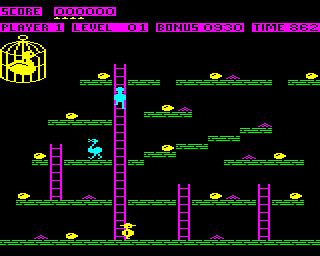
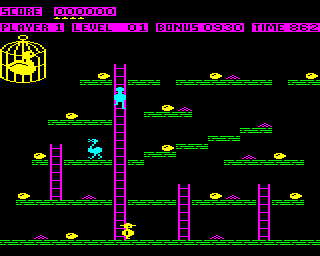
Every run matches on every frame, including through deaths, game over and up to level 38. A few slips in translation were caught by checking the JavaScript against the disassembly before the test existed. One was a branch that checks whether a number is negative, used the wrong way round in the wall check. The test's own early failures were all in the test itself, mostly about at exactly which point in a frame to compare the two.
8Where it isn't the original
- The font. The BBC's lettering lives in a chip in the computer, not on the disk. Text uses a lookalike 8×8 font written for this.
- No title sequence. As agreed, the BASIC loader's logo and instructions page are skipped; the page opens on the game's own title screen.
- Choosing keys. The original rejected some key combinations that its keyboard wiring couldn't detect together; modern keyboards don't have that limit, so that check is gone. It also tended to take the K you'd just pressed as your new "up" key. The new version waits for you to let go first.
- A possible lock-up removed. If a bird ever had no way to go, the original would loop forever. Here it turns back instead. No layout seems to allow this.
- One guess about sound. The egg sound's envelope contains a step of zero, and the documentation available didn't settle how the OS treats that. Taken literally it gives a two-centisecond click. I chose the reading that gives a short chirp with a fade-out instead.
- Delays. Pauses outside play, and the speed of the bonus count, are set from the measured cycle counts rather than raw processor speed.
9Added since
- The arrow keys work as well as A, Z, comma and full stop.
- On touch screens there are on-screen controls. The direction pad's corners give two directions at once, so a thumb can hold up+right (run on, and take the next ladder up) while the other thumb presses Jump. Buttons stand in for the other keys, and the phone's keyboard pops up for high-score names.
- Play together: up to four players on the same level at once, online. Every player's browser runs the same game in lockstep. The game is fully deterministic (the comparison test proves it, frame by frame), so the only thing sent over the network is each player's five control bits per frame. A small room server built with PartyServer, a Cloudflare Durable Object, collects them and sends everyone the same bundle each turn. Your key presses take effect three frames (about 0.1 s) later, which gives the bundles time to arrive. A test runs three simulated browsers with random network delays and checks they compute identical games turn by turn.
- Adding
#level=7to the address starts new games on that level, e.g. level 9, where the big bird gets out. - The page is a Cloudflare Worker serving the project as static files, and the source can be browsed: src/, tests/, tools/.